
Top AI Tools for Photographers in 2026
Here are the top AI tools photographers should be using in 2026.
Savio Xavier Pereira
5/7/20263 min read
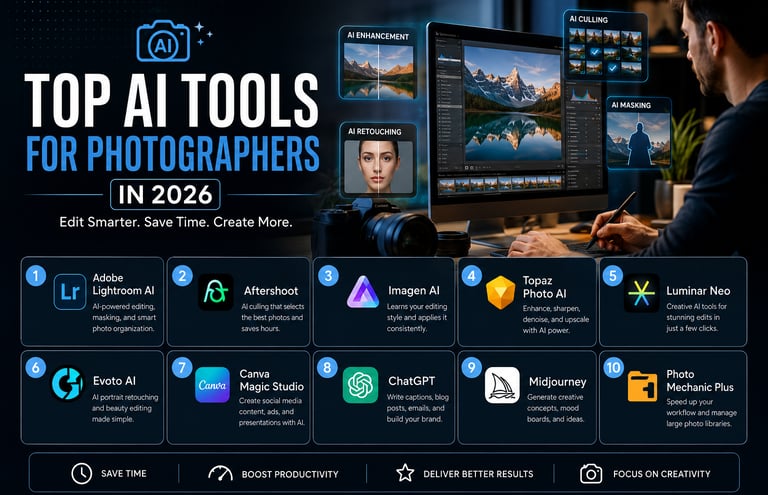
Artificial Intelligence is no longer a futuristic concept for photographers. In 2026, AI has become an essential part of professional photography workflows — from culling thousands of RAW files to retouching portraits, generating marketing content, improving image quality, and even writing SEO blog posts.
According to recent industry studies, over 80% of photographers now use AI tools in some part of their workflow. (Digital Camera World)
Whether you are a wedding photographer in Dubai, a commercial photographer in Abu Dhabi, or a content creator shooting for brands across the UAE, AI tools can dramatically reduce editing time and improve consistency.
Here are the top AI tools photographers should be using in 2026.
1. Adobe Lightroom AI — Best Overall AI Photo Editor
Adobe continues to dominate the photography industry with AI-powered tools integrated directly into Lightroom and Photoshop.
Key Features
AI masking
One-click subject and sky selection
AI denoise
Generative object removal
Smart presets
AI search for photos
Lightroom AI is ideal for photographers who already work inside the Adobe ecosystem. The AI tools help reduce editing time while maintaining creative control. Adobe’s ethical AI approach using licensed training data has also helped build trust among professionals. (Digital Camera World)
Best For
Wedding photographers
Sports Photographers
Commercial photographers
Fashion photographers
High-volume editing
2. Aftershoot — Best AI Culling Tool
Culling is one of the most time-consuming parts of photography. Aftershoot uses AI to automatically select the best images from thousands of shots.
Key Features
AI culling
Closed-eye detection
Duplicate removal
AI editing profiles
Offline processing
Many photographers report saving hundreds of hours per year using AI culling tools. (ToolsBrief)
Best For
Wedding photographers
Event photographers
Sports photographers
3. Imagen AI — Best for Learning Your Editing Style
Imagen AI learns your personal editing style and applies it automatically across entire galleries.
Key Features
Personalized AI profiles
Lightroom integration
Skin tone consistency
Batch editing
Cloud processing
This is especially useful for photographers who want consistency across large client projects.
Best For
Portrait photographers
Wedding photographers
Studio photographers
4. Topaz Photo AI — Best AI Image Enhancement Tool
Topaz Photo AI has become the industry leader for sharpening, denoising, and upscaling images.
Key Features
AI sharpening
AI noise reduction
Upscaling low-resolution photos
Face recovery
Motion blur correction
If you shoot in low light or need to rescue imperfect images, Topaz is one of the most powerful tools available today.
Best For
Wildlife photographers
Concert photographers
Sports photographers
Low-light photography
5. Luminar Neo — Best Creative AI Editing Software
Luminar Neo focuses heavily on creative AI-powered editing with easy-to-use controls.
Key Features
AI sky replacement
Portrait enhancement
Relighting AI
Background cleanup
Generative erase
Unlike Photoshop, Luminar Neo is designed to make advanced edits simple and fast.
Best For
Landscape photographers
Travel photographers
Portrait photographers
6. Evoto AI — Best AI Retouching Software
Evoto AI is becoming increasingly popular for portrait retouching and beauty photography.
Key Features
Skin retouching
Facial adjustments
AI makeup
Background editing
Batch portrait editing
It dramatically speeds up retouching workflows while maintaining professional quality. (Digital Camera World)
Best For
Beauty photographers
Fashion photographers
Headshot photographers
7. Canva Magic Studio — Best AI Tool for Social Media Content
Photographers are no longer just delivering photos. Clients now expect reels, graphics, thumbnails, and social media content.
Canva’s AI tools help photographers quickly create:
Instagram posts
Photography ads
YouTube thumbnails
Client presentations
Mood boards
Best For
Freelance photographers
Content creators
Photography marketing
8. ChatGPT — Best AI Assistant for Photographers
ChatGPT has become an essential business tool for photographers in 2026.
What Photographers Use It For
Writing SEO blog posts
Instagram captions
Client emails
Photography proposals
YouTube scripts
Shot lists
Location ideas
Website copy
AI is increasingly being used not just for editing photos but for running photography businesses more efficiently.
Best For
Photography marketing
SEO
Client communication
Business automation
9. Midjourney — Best AI Tool for Creative Concepts
Midjourney is widely used by photographers for concept development and creative inspiration.
Common Uses
Mood boards
Lighting concepts
Fashion campaign ideas
Storyboarding
Pre-visualization
Many commercial photographers now use AI-generated concepts before actual shoots.
Best For
Fashion photographers
Commercial photographers
Creative directors
10. Photo Mechanic Plus — Best Workflow Management Tool
Although not fully AI-based, Photo Mechanic remains a favorite among professionals for managing large photography workflows efficiently.
Combined with AI culling tools, it creates an extremely fast workflow for high-volume photographers.
Best For
Sports photographers
Photojournalists
Event photographers
How AI Is Changing Photography in 2026
AI is not replacing photographers. Instead, it is removing repetitive tasks so photographers can focus more on creativity and client experience.
The biggest AI trends in photography right now include:
Faster culling
Automated editing
AI retouching
Content generation
Workflow automation
Smart marketing tools
AI-powered search and organization
However, many photographers still prefer AI as a supporting tool rather than a replacement for creative decision-making.
Final Thoughts
The best AI tool depends on your photography niche and workflow.
Need faster editing? Use Lightroom AI or Imagen AI.
Need faster culling? Use Aftershoot.
Need better image quality? Use Topaz Photo AI.
Need portrait retouching? Use Evoto AI.
Need marketing help? Use ChatGPT and Canva.
In 2026, photographers who combine creativity with AI efficiency will have a major competitive advantage. The goal is not to replace artistic vision — it is to spend less time on repetitive tasks and more time creating exceptional work.
For photographers in the UAE, where fast turnaround times and premium content are increasingly expected, AI tools are quickly becoming an essential part of staying competitive.